
Debian - Roundcube - Dovecot - Sendmail - Multidomain OATH2 with Kinde.com:
The Goal:
Realize a public accessible webmail email client, that services multi- domain accounts but protected by an external online oAuth provider preferably passwordless / simple and economical.
Components used:
- Debian - the universal OS.
- Dovecot - the imap mail client handler which supports now also oAuth2.
- Sendmail - the good old versatile well documented MTA, you can add easely Milters / spamassassinSpamAssisin / openDkim etc.
- oAuth2 - kinde.com, a simple platform for managing IAM a cost friendly alternative for paid accounts like MS or google G Suite, and or Google Workspaces.
- RoundCube - the email client I already had working / selected before, with properly working web interface for mobile devices.
Challenges:
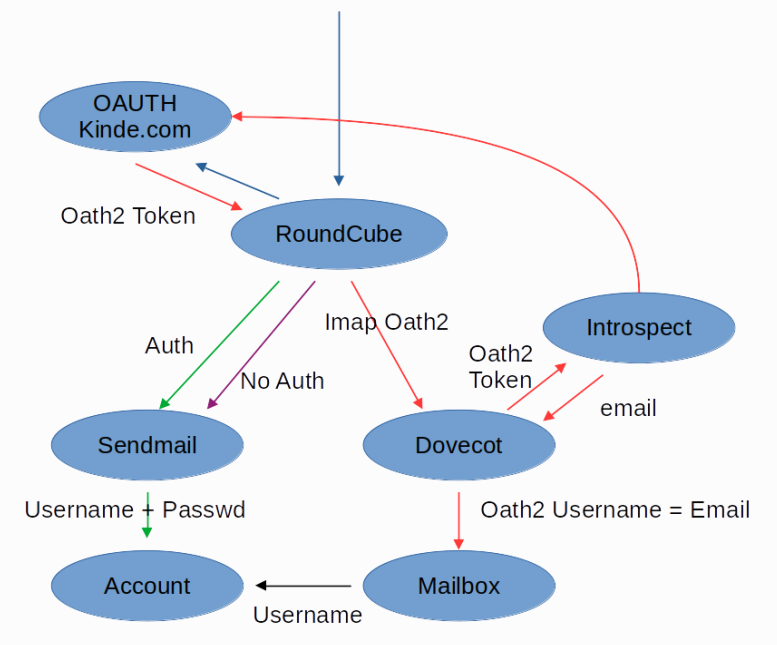
oauth2 works with tokens and or possible email address as accountnames but will not provide you a password. Sendmail AUTH requires a username / password validation Account names are mostly in the form of email addresses formulated, i.e. me@domain.xyz while accounts are only the "me" part. 1 account for multiple email domains.
Schematic layout to understand the different types of data flows required:
How to Glue it together:
- 1) Head over to kind.com and create an account, and setup your tenant.
- 2) Follow the steps hereunder (only the important steps are detailed, other basic stuff is left out)
You can choose from 2 scenario's:
- A) 2 vm's whith seperated functionality one VM with MTA && one VM with exclusive setup for RoundCube
- B) 1 vm with all components installed together.
Steps to setup:
- 1) Setup sendmail to handle your incoming email and config the next 2 sections
- 2) Setup Dovecot to handle your email and configure the following 3 sections
- 3) Setup Roundcube in your favourite way ( https://roundcube.net/download/ )
- 4) Configure Roundcube to use oauth
1) Setup sendmail to handle your incoming email and config the next 2 sections:
In case you want to setup Roundcube on another host then localhost, you should add this IP to the list that can send emails without using AUTH.
If configure it all inside 1 vm ( sendmail && dovecot && roundcube ) you can leave this step out.
# 1.1) Add the IP to the config like this:
/etc/mail/access
srv_features:192.168.1.2 L
# 1.2) Enable use of access file:
/etc/mail/sendmail.mc
disable: FEATURE(`access_db', , `skip')dnl
enable: FEATURE(`access_db')dnl
Now rerun sendmailconfig to activate the settings
2) Setup Dovecot to handle your email and configure the following 3 sections:
# 2.1 Correct the mailbox format ( to use ONLY the username )
/etc/dovecot/conf.d/10-mail.conf
mail_location = mbox:~/mail:INBOX=/var/mail/%n
# 2.2 Modify "userdb" && "passdb" default /etc/passwd lookup:
/etc/dovecot/conf.d/auth-system.conf.ext

# IMPORTANT: in userdb "%n" Validateds ONLY the username ( me ) of the email part, without domain ( my@mydomain.com )
# in the lookup of the user in /etc/passwd ( if not it will try to lookup a system username with the full email address )
userdb {
  args = username_format=%n /etc/passwd
  driver = passwd-file
}

# IMPORTANT: Since there is NO password provided, the only form of validating if this user has valid crediantials is
# to validate the token that is passed along ( used in the introspection )
passdb {
  args = /etc/dovecot/dovecot-oauth2.conf.ext
  driver = oauth2
  mechanisms = xoauth2 oauthbearer
}

# 2.3 Add the proper detials to contact the "introspection" endpoint
root@mta:~/dovecot# cat /etc/dovecot/dovecot-oauth2.conf.ext
introspection_mode = post
# You need to fill an URL which can validate the token
introspection_url = http(s)://[url to verify token]/
# The field to check in this case is: "preferred_email"
username_attribute = preferred_email
active_attribute = active
active_value = true


# 2.4 you can take different routes here:
# A) the real inrospection endpoint, where you can validate this given token or
# B) just validate the email address that belongs to this token by checking the "/me" endpoint
I took the easy way out, since I dont see to much added value in the whole introspect approach. So I configured an internal endpoint as proxy that just validateds the token against Kinde and collects the prefered email address. You can do this as well by setting up an endpoint with this small piece of php code : https://github.com/libc225so/kinde-proxy/tree/main.
3) Setup Roundcube in your favourite way ( https://roundcube.net/download/ )
4) Configure Roundcube to use oauth
// For IMAP ( incoming )
$config['oauth_provider']		= "Kinde";
$config['oauth_provider_name']		= "Kinde oAuth2";
$config['oauth_client_id']		= "[ your kinde client id ]";
$config['oauth_client_secret']		= "[ your kinde client secret ]";
$config['oauth_auth_uri']		= "https://[ your site name ].kinde.com/oauth2/auth";
$config['oauth_token_uri']		= "https://[ your site name ].kinde.com/oauth2/token";
$config['oauth_identity_uri']		= "https://[ your site name ].com/oauth2/v2/user_profile";
$config['oauth_identity_fields']	= ['email'];
$config['oauth_scope']			= "email";
$config['use_https']			= true;	// This is used for the callback url to use https instead of http

// For SMTP ( outgoing )
$config['smtp_host'] 			= '192.168.1.1';	// '[ Your MTA (sendmail) installed host ]';
$config['smtp_user']			= ''; 			// These empty values indicate to skip username &&
$config['smtp_pass']			= '';			// password validations
Done
Now you should have a working config for roundcube using Dovecot && sendmail